

You want to play a song you love, but there's no sheet music or chord chart anywhere. Or you recorded a riff of your own and can't tell what the chords are. So how do you actually find them?
There are three main ways to find a song's chords: ① work them out by ear, ② look them up on a chord site, or ③ detect them automatically with an app. They differ in speed, accuracy, and whether they work on any song.
Let's compare all three fairly, then walk through the fastest route step by step.
Comparing the three methods
| Method | Speed | Accuracy | Works on | Cost |
|---|---|---|---|---|
| By ear | Slow (takes practice) | Depends on your theory | Any song | Free but time-consuming |
| Chord sites | Fast | Varies by poster | Popular songs only | Mostly free |
| App detection | Fast | Basic chords are solid | Your own audio & playing | App (free tier) |
① Work them out by ear (using theory)
Listen to the song and pin down the chords yourself. It works on any song — that's the big advantage. The catch is that guessing chords whole is hard and slow.
The trick is the order you do it in. First, find the key of the song and the bass note of each chord (the lowest note). Once you know the bass note, the chords stacked on top can be narrowed down with theory — from the diatonic chords available in that key. Instead of hunting note by note, you make educated guesses with theory. That's what separates it from random by-ear guessing, and the more theory you know, the faster and more accurate it gets. This "find chords with theory" approach is covered in The Science of Ear Training.
② Look them up on a chord site
Search the song title on a chord site like Ultimate Guitar. For a well-known song, it's often the quickest option — a few seconds and you're done.
It has three weaknesses. Only popular songs are listed (your own or obscure songs won't appear), quality varies by poster (mistakes and simplifications are common), and the key may differ from the original. Think of it as "fast if it's there — but it may not be there, or may not be right."
③ Detect them automatically with an app
Analyze the audio itself and let the app write out the chords. For your own audio or your own playing, this solves the slowness of by-ear work and the coverage gap of chord sites at once. Basic chords come out reliably, and you get the key and the section boundaries alongside them (you can name them verse, chorus, etc. afterwards).
Here's how to do that detection in the OtoTheory iOS app.
The fastest route: chord detection in OtoTheory
OtoTheory's Get Chords is an iPhone and iPad feature that detects the actual chords from audio. Everything runs on-device — your audio is never uploaded anywhere.
There are two ways to bring in the audio.
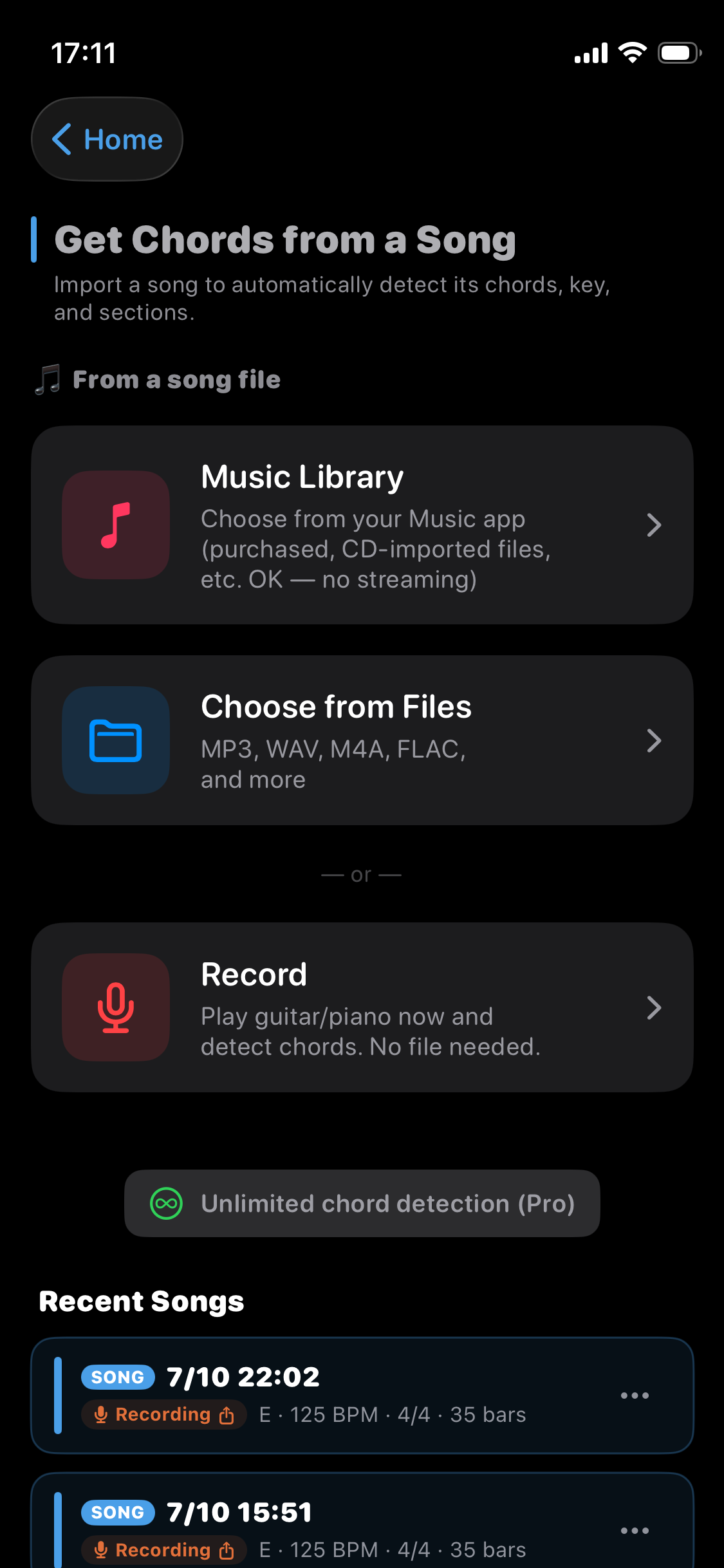
Step 1: Bring in the audio
- Import a song you own: choose a purchased track, a CD rip, or your own audio file.
- Record your own playing: play guitar or piano on the spot. Works for singing along or a riff you just came up with.
⚠️ Apple Music and Spotify streaming tracks are DRM-protected and can't be analyzed. The sources are "audio you own" and "your own playing."
Step 2: Run the detection
Once you pick the audio (or finish recording), on-device analysis starts. In a few dozen seconds you get the chord progression, key, and sections.
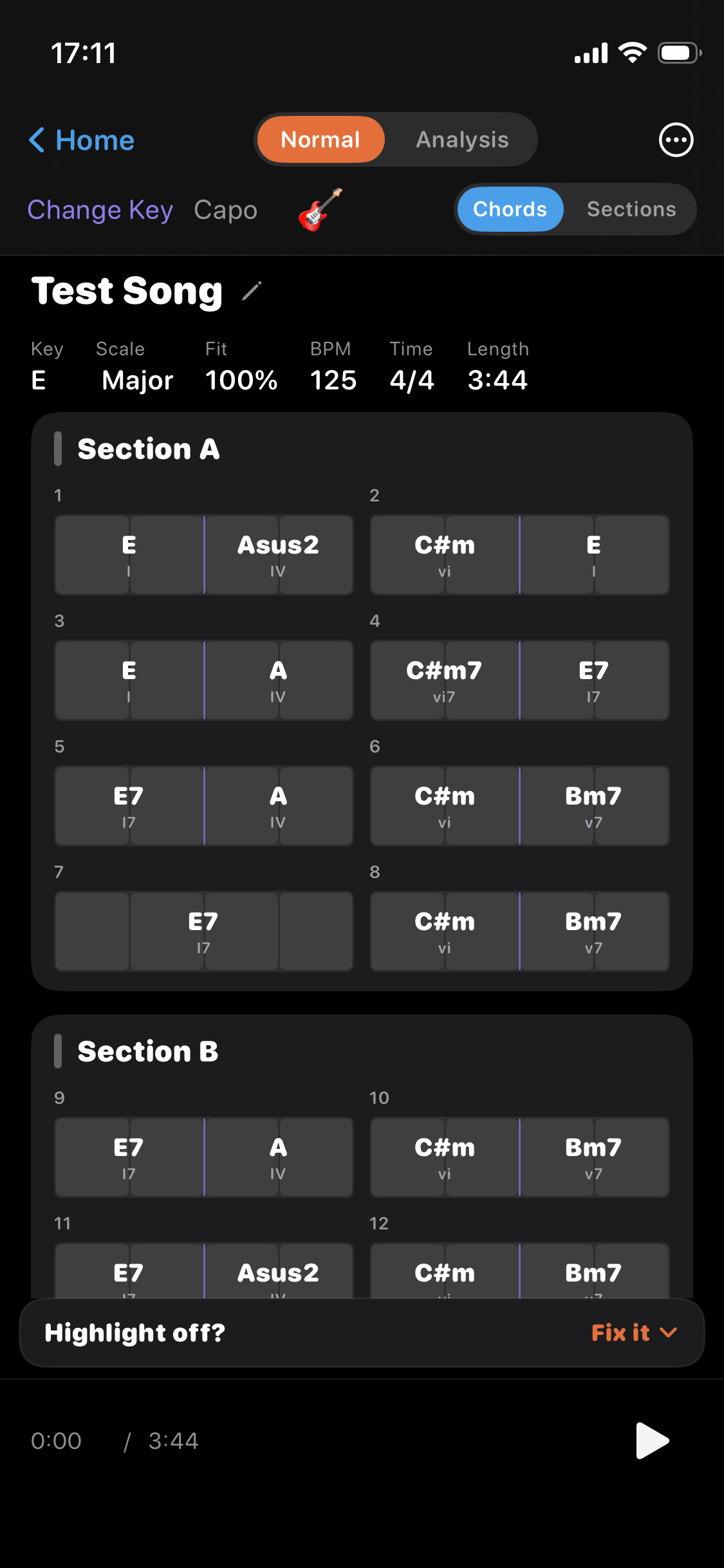
Step 3: Play back, check, and fix
Play the detected chords back to check by ear. Anything that isn't quite right, you can fix by hand:
- Re-enter a chord
- Tap the beat to line up the timing
- Change the tempo (×2 / ÷2) and time signature
"Automatic for 80%, hand-finish the rest" is the realistic way to get both speed and accuracy.
What you can do with the chords
Finding the chords isn't the finish line. Inside the app, OtoTheory lets you build on what it detected.
- Theory analysis: each chord gets its degree, function, and key automatically — so you can see why a progression sounds good.
- Play back to check: play the result and match it against the original by ear.
- Practice with the fretboard: chord diagrams switch in time with playback, so you can practice while watching how to hold each chord.
- Arrange: show the chord tones and scale of the playing song on the fretboard or keyboard — handy for arranging a cover or your recording.
- Send to Create mode: send a progression you like to Create mode, then swap and add chords to grow it into your own song. Playing with a groove is a Create-mode feature too.
- Export (your own recordings only): Audio is free; MIDI and PDF are Pro. MIDI goes into your DAW. ※ Imported songs can't be exported, for copyright reasons.
Getting cleaner detection
When you record your own playing, a little prep noticeably improves the result.
- Play along with the count-in and tempo: use the app's count-in and tempo, and play to that beat — the beats and bars line up and detection improves.
- Record at a solid volume: when recording through the mic, keep the playing loud enough. Quiet audio makes chords and beats harder to pick up.
- Streaming tracks can't be analyzed: Apple Music / Spotify are DRM-locked. Use audio you own, or your own playing.
The triads that form the backbone of the chords are detected reliably. If a complex chord isn't fully captured somewhere, just re-enter it yourself and finish it off — "automatic for the backbone, hand-tune the details" is the way to use it well.
Frequently asked questions
Can I find the chords of an Apple Music or Spotify song?No. DRM-protected streaming tracks can't be analyzed. The sources are your own audio files, songs you've purchased, CD rips, and live recordings of your own playing.
Can I find chords without knowing music theory?Yes. With automatic detection you don't need to know keys or degrees — the chords are shown for you. Each detected chord also comes with theory analysis (degree, function, key), so you learn as you go.
Can I play back the chords to check them?Yes. You can play the detected chords straight away to check by ear. Send them to Create mode and you can edit the chords and play them with a groove too.
By ear or with an app — which should I use?Use ear training if you want to learn to figure chords out yourself with theory; use the app if you just want them fast and accurate. Checking your ear work against the app is the most efficient way to improve both.
Is it free?Chord detection is an iOS app feature. Basic detection, analysis, and editing are available on the free tier. Exports like MIDI and PDF are Pro features.
Try it on iPhone or iPad
Chord detection is a feature of the OtoTheory iOS app. From a song you own or your own playing, get the chords, key, and sections on the spot.
Related guides
- What Get Chords is — how import and recording work
- How to find the key of a song — find the key along with the chords
- The Science of Ear Training — finding chords with theory
📖 References
The following sources were used in writing this article. (※ To be finalized before publish.)
Finding and hearing chords* How to Figure Out the Chords to a Song – Musical U — approach to finding chords with theory
* Ear Training – musictheory.net — grounding in pitch and key
Up next: a guide on recording your own playing to get the chords.