

With a guitar in your lap, or a DAW piano roll in front of you, you play a C. It sounds good. But you have no idea which chord to put next, and your fingers just stop. Nearly everyone hits this wall when they start writing.
Here's the thing: lining chords up at random rarely makes a progression that sounds good. A progression that feels right has a story underneath it, grounded in music theory. And what builds that story is the role each chord carries — tonic, subdominant, and dominant. Learning these roles and actually using them is the quickest way into writing progressions.
Not sure what "tonic," "subdominant," and "dominant" mean? These are the names for the roles a chord plays within a key. They come up again and again below, so if the terms are new to you, it helps to skim these two articles first:There are three main ways to choose the next chord: ① connect chords by their roles, ② borrow a common "move," or ③ let the app suggest the next chord. Each one narrows an endless list of options down to a meaningful few.
- What are diatonic chords? — how choosing a key decides which chords you can use
- Learn chord progressions — the roles of tonic, subdominant, and dominant
You don't have to memorize it all right now. Coming back when you get stuck works just as well.
Three ways to find the next chord
① Connect chords by their roles
Every chord inside a key has its own character, or role. There are roughly three:
- Tonic (home) — the settled, stable chord (in key C, that's C)
- Subdominant (stepping out) — a chord that adds a little movement (like F)
- Dominant (the way home) — a chord that builds tension and makes you want to return home (like G)
Leave home, wander a little, come back. That flow — tonic → subdominant → dominant → tonic — is the skeleton under a lot of songs. When you're stuck on the next chord, ask yourself: do I want to step out here, or head home? That alone narrows a huge field of options. The roles are covered in more detail in Learn chord progressions.
② Borrow a common "move"
Certain chord-to-chord moves are so effective they've been used in every era — call them "strong moves." The most effective is the dominant resolving to the tonic (e.g. G → C). Built-up tension releases all at once, and you get a clear "we're home" arrival. This is called a cadence, and it's essential for closing off a section. The mechanism is explained in What is a cadence?.
A few handy moves worth remembering:
| Move | Effect |
|---|---|
| G → C (V → I) | The strongest resolution — that "back home" feeling |
| ii → V → I (e.g. Dm → G → C) | A classic close; the backbone of jazz and pop |
| IV → V → I (e.g. F → G → C) | A bright, strong close |
| vi → IV (e.g. Am → F) | Moving from wistful to bright — a pop staple |
These patterns are far faster than dreaming something up from scratch, and much harder to get wrong. Borrow from those who came before, then bend the rules once you're comfortable. Real examples of how famous songs use them are collected in the Progression Gallery.
③ Let the app suggest the next chord
That said, for a beginner it's genuinely hard work to figure out "which chord is the dominant, which is the subdominant," or "what a diatonic chord even is." Methods ① and ② are shortcuts, but they're still a steep first step.
That's exactly what the app's suggestion feature takes off your plate. With OtoTheory's suggestions, you don't need to know the theory — the app automatically offers dominants and subdominants that fit your progression, each labeled with its role. You try them intuitively and build a natural progression as you go. Instead of puzzling it out in your head, you choose by ear. From here, let's walk through it for real in OtoTheory's Create mode.
Now try it for yourself
Enough theory. The fastest way forward is to get hands-on. Just follow these steps straight through in OtoTheory's Create mode (iOS app).
Step 1: Pick a key and scale
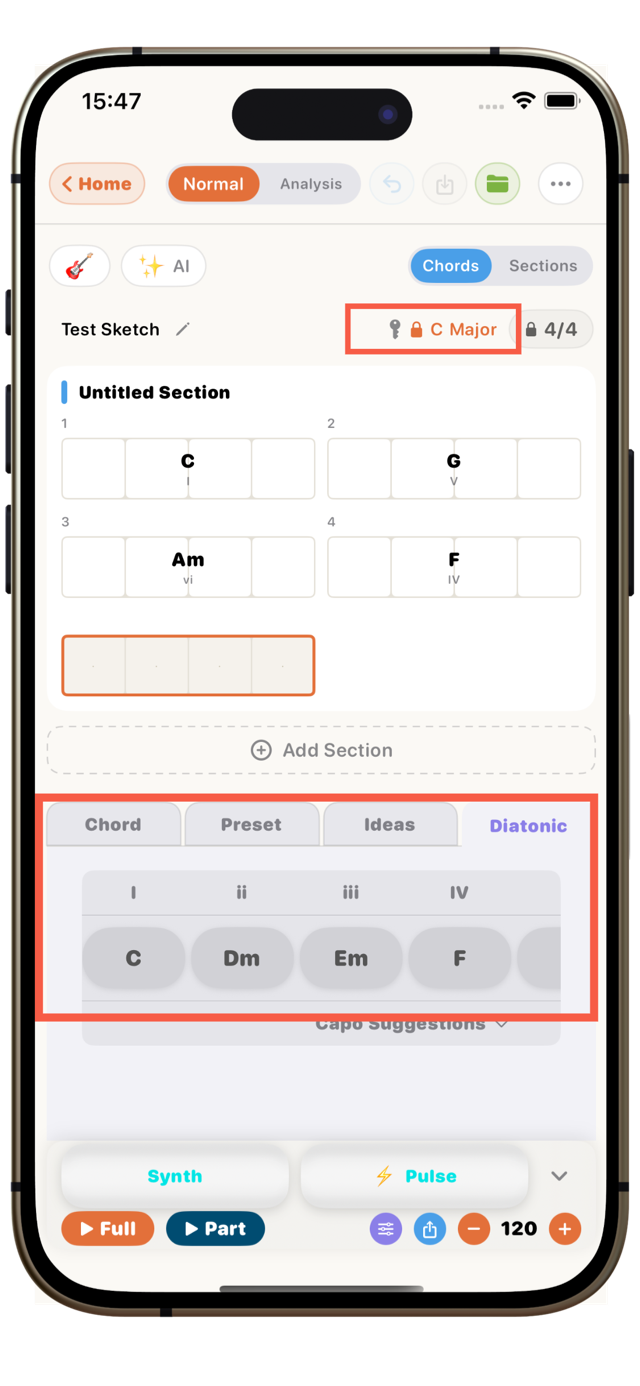
Choose a key and scale in Create mode. That key's diatonic chords appear, giving you your "range of chords that fit" — the foundation of the progression. This is your starting point.
The key and scale start out set to C major. If you're not sure, just go with that default (it's easy to work with, and you can move everything to another key later).
Step 2: Open the Ideas tab for a first-chord suggestion
Below the chord-input area are tabs: Chord / Preset / Ideas / Diatonic. A different tab (such as Preset) may be open at first — switch to the Ideas tab.
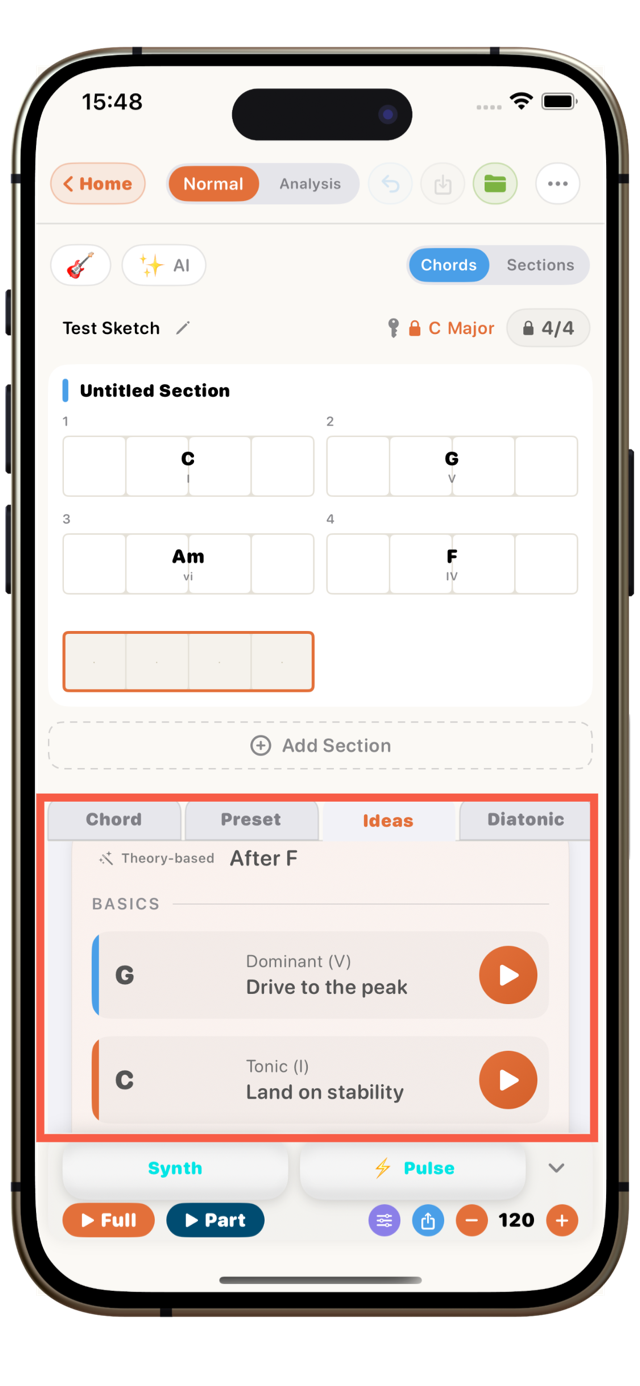
OtoTheory then suggests chords that work well as an opener (like the tonic — stable and easy to start on). Don't overthink it; just place one of the suggestions to begin.
Step 3: Get suggestions for the next chord
Once you place a chord, it suggests candidates for "what fits next," labeled by role (tonic / subdominant / dominant) in line with music theory. Each comes with its effect ("adds openness," "builds tension," "lands on stability," and so on), so you can choose by the kind of movement you want. Repeat this, and the progression moves forward one step at a time.
Step 4: Try them and shape your own progression
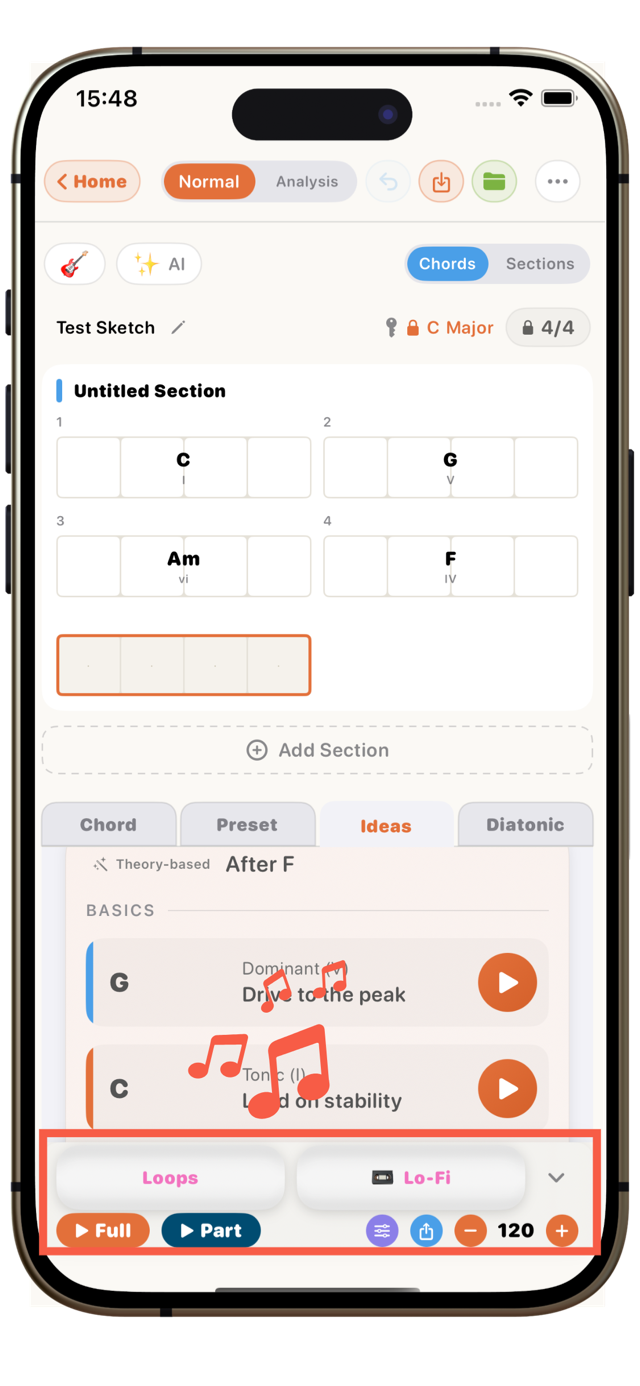
You can audition each candidate on the spot using the play button on its right edge. Play it, and when one clicks, tap the card to place it in your progression. Add a groove (rhythm) and hear it on a real rhythm, and "good / not quite" becomes obvious. You don't have to memorize the theory — just auditioning the suggestions and choosing is enough to build a progression that's yours.
Where people tend to get stuck
- Don't hunt for "the one right chord": there's no single correct next chord. As long as the role points the way you want (heading home, or stepping out), several chords can all work. When in doubt, don't overthink — audition and decide by ear.
- Leaning too hard on strong moves gets monotonous: repeat G → C over and over and it's reassuring, but predictable and a little dull. Wander off through a subdominant now and then, or mix in a surprising chord, and the song gains character.
- Stray too far from the key and you get lost: at first, sticking to chords inside the key (diatonic chords) keeps the progression stable. Once you're comfortable, add chords from outside as spice, little by little. The idea of substitution in What are substitute chords? is a good place to look next.
Frequently asked questions
How do I decide which chord comes next?Thinking in terms of a chord's role is the quickest route. Use a tonic to settle, a subdominant to add a little movement, a dominant to build tension and close things off cleanly. Just keeping that flow in mind makes the direction of the next chord clear.
Can I choose the next chord without knowing theory?Yes. The app's suggestion feature lists candidates that fit your progression, each labeled by role and effect. You just audition them on the spot and choose. Choosing by ear, you start to notice why each chord works, so the theory sinks in naturally as you use it.
Are there rules for chords connecting naturally?There are long-standing "strong move" patterns. Dominant to tonic (e.g. G → C), for instance, has the strongest "pull home" and creates a clear sense of arrival. Others like ii → V → I and IV → V → I are classics. Borrowing these time-tested patterns is the quickest way to a natural progression.
What if the next chord feels "off"?Trust your own ear. If it sounds wrong when you audition it, swap in another candidate without hesitation. Chords that share more notes with the previous one connect smoothly; ones with fewer shared notes sound more surprising. Pick whichever matches the mood you're after.
Is it free?The basics — placing chords, getting suggestions, and playing them back — are all on the free tier. Some features, like MIDI and PDF export, are part of Pro.
Try it on iPhone or iPad
When you stall on "what chord comes next," open OtoTheory's Create mode (iOS app) and take its suggestions. Just pick the sound that feels good to your ear from candidates labeled with role and effect, and your progression starts moving again.
Related guides
- How to Make a Chord Progression — build a progression from the very first step
- Learn chord progressions — the roles of tonic, subdominant, and dominant
- What is a cadence? — how chords "come home"
- Progression Gallery — real examples of the classic progressions songs use
📖 References
The following sources were used in writing this article. (※ To be finalized before publish.)
Chord roles and connecting chords* Chord Functions and Progressions – musictheory.net — the roles of tonic, subdominant, and dominant
* Common Chord Progressions – Hooktheory — how common moves are used
Up next: a guide on how to play guitar chords.